

CopilotOnToast: Making GitHub Copilot CLI a Little More Noticeable
A small PowerShell utility that adds Windows toast notifications to GitHub Copilot CLI hook …
ChefCollect is now live in production, which is a sentence I have wanted to write for a long time. Not just because the platform itself has been in my head for a long time, but because it represents something I have rarely managed to do properly before: build and release a polished piece of software for myself outside of work.
I have been a software engineer for most of my career. I have built platforms for clients, teams, organisations, and industries of all shapes and sizes; legal, healthcare, insurance, and business services firms. I have worked on APIs, data pipelines, cloud platforms, integration layers, delivery models, and all the other serious bits of software that make systems actually work. But beyond a few blogs over the years, I had never really taken one of my own ideas all the way from “that might be interesting” to “this is live and people can use it”.
In my work life I now spend a lot of time thinking about how engineers use AI tooling at scale. I direct large-scale engineering teams, work with modern developer platforms, and spend a lot of time considering how these tools change the way software is planned, built, reviewed, and delivered. But using them seriously on a project where I was the only human in the room was a very different experience.
ChefCollect started during Christmas 2024 as one of those slightly dangerous experiments that begins with “I wonder if…”. I had become interested in whether generative AI could extract useful structured information from photographs of cookbook pages. Like a lot of people who cook, recipes in our house are scattered everywhere: physical cookbooks, screenshots, websites, Instagram posts, notes, and half-remembered recommendations from friends. The cooking is enjoyable. The organising is not.
The original idea was fairly simple. Could I take a photo of a cookbook page and turn it into a useful digital recipe? Not a perfect one. Not some magical AI fantasy where the machine understands the entire cultural and emotional history of your dinner plans; just something useful enough to capture the ingredients, steps, and basic structure, so that the recipe could be searched for, edited, collected, and used again later.
That experiment became ChefCollect.
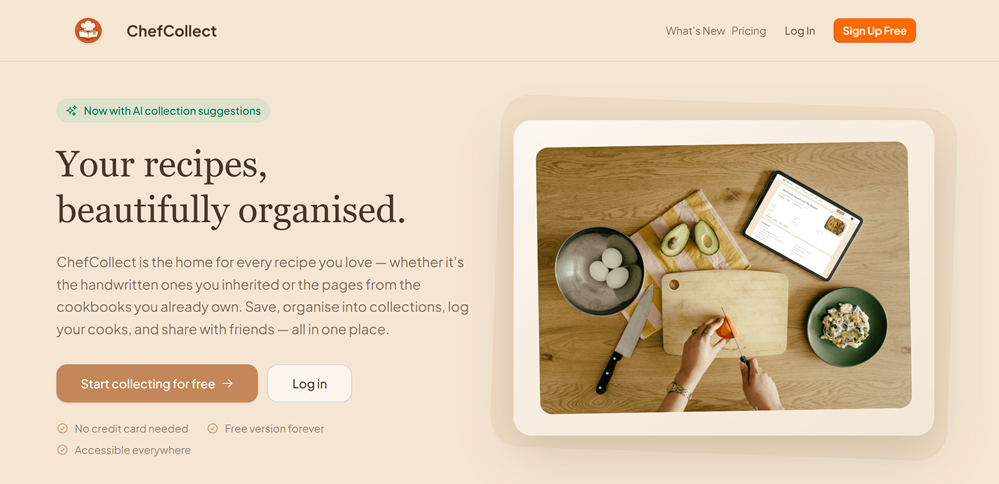
ChefCollect is a recipe collection platform. At its heart, it is designed to help you capture, organise, search, and share recipes, especially the recipes that currently live in awkward places:
Things you cooked once and swore you would remember, only to forget where they came from later.
The first major feature is AI-assisted recipe extraction from images. You upload a photo or screenshot, ChefCollect analyses it, and the platform attempts to turn it into structured recipe information: ingredients, steps, timings, servings, categories, and other useful metadata. From there you can edit the result, save it to your collection, and find it again later.
You can try the first production release at chefcollect.net.
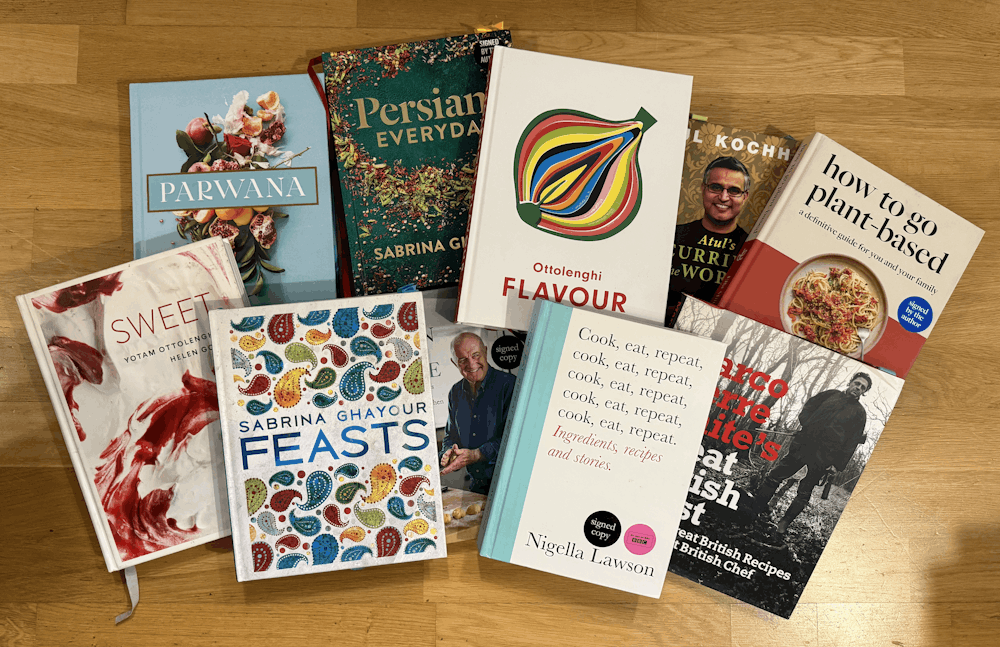
The aim is not to replace cookbooks or recipe websites. I still love physical cookbooks (and have many signed by notable chefs), and I do not want a world where every recipe becomes a flattened piece of content in yet another generic database. The aim is to make the recipes you already care about easier to use. ChefCollect is for the food you have collected, cooked, inherited, saved, been recommended, or simply meant to try one day.
That distinction matters to me. ChefCollect is not intended to be an infinite content farm of AI-generated recipes. It is not trying to spam the world with synthetic variations of “easy weeknight pasta”. It is much more personal than that. It is a tool for collecting the food that matters to you, then making that collection easier to navigate, while also supporting the idea of “forking” those recipes (I said I was an engineer at heart). The idea is that you can have different versions, modifications, updates, and the history to go with it.
ChefCollect today is still early, but the longer-term idea is broader than extraction. I want it to become a place where collections, sharing, discovery, household cooking, and personal recipe history can live together without becoming noisy or impersonal.
Normally, this is where my side projects would start to die. I can usually find the time to get a proof of concept working; build the API, design the data model, and of course register the domain name. I can wire up authentication, storage, background processing, observability, infrastructure, CI/CD, and the rest of the serious engineering machinery. That is my comfort zone.
The hard part for me has always been finding the time for the product layer. How should this feel? What should the first page look like? What is the right shape of the user journey? Is this screen obvious? Does this empty state help someone understand what to do next? Is this button in the right place? Does the whole thing feel warm, useful, and trustworthy?
That is not where I naturally shine; there was a reason my art teachers at school encouraged me to skip lessons, I really was that bad. At work, I have expert UX designers who work with my teams to create the most human-centric workflows and designs possible (an often under appreciated, but critical, part of creating software).
I am very comfortable with systems thinking, engineering decisions, platform trade-offs, and all the invisible structures that make software work. But visual design and user experience have always felt like another language. One I could understand, but not speak fluently. I could tell when something was wrong, but not always how to make it right. Having spent most of my work life building line-of-business apps, and with the previously mentioned artistic talent of a dead parrot, that is not overly shocking.
That is where this generation of AI tooling changed the shape of the project. It did not magically make me a designer, nor did it remove the need for judgement. It also did not build the product while I drank coffee and occasionally nodded approvingly. It gave me leverage in the areas where side projects usually collapse: design, polish, momentum, decision-making, and the long middle section where the exciting idea has become a large list of awkward tasks.
ChefCollect was not built by one AI tool. It was built through a mixture of my own traditional engineering, modern AI tooling, and a growing set of agentic workflows. Different tools helped at different points, and part of the learning curve was understanding which tool was useful for which kind of work, and how to make them interoperate.
That is one of the things I think people often miss when talking about AI-assisted development. The useful question is not “which AI tool or model writes the best code?” The useful question is “what kind of thinking, designing, reviewing, implementing, or refining am I trying to do right now?” The answer to that question changes which tool is useful.
| Tool | Where it helped most |
|---|---|
| ChatGPT | Broad planning, product thinking, research, policy drafting, and feature shaping |
| Figma Make | Visual design exploration, UX iteration, clickable prototypes, and design testing |
| html.to.design | Bringing generated or prototype HTML into Figma for further refinement |
| GitHub Copilot | Implementation at pace through agent workflows and day-to-day development |
| Squad Framework | Multi-agent orchestration, role separation, and structured review |
| OpenAI Codex | Targeted changes, ticket fixes, reviews, and an alternative engineering lane |
| MCP Servers | Connecting agents to supporting tools such as Figma, Sentry, Stripe, and other project context |
ChatGPT was most useful at the broad, messy, early-thinking level. I used it to explore feature ideas, monetisation options, user journeys, privacy and policy wording, subscription models, architecture trade-offs, and the general shape of the platform. Its deep research mode not only helps shape your ideas, but also saves a lot of tokens versus using the AI coding assistant to do all of the planning.
This is where conversational AI still feels most naturally useful to me. Not as an oracle, and definitely not as something that should be blindly trusted, but as a thinking partner. It helped me turn vague intent into structured plans. It helped me test whether an idea sounded coherent outside my own head. It helped me ask better questions about what ChefCollect should become.
Sometimes the value was in the answer. Often the value was in the pushback, or simply in having something written down badly enough that I could react to it and make it better.
Figma Make helped me get out of my own visual design limitations. I could describe the mood, constraints, and purpose of a screen, then iterate towards something much better than I would have produced alone. That did not mean accepting every generated design. It meant using the tool as a design collaborator.
ChefCollect needed to feel warm, food-related, approachable, and useful without becoming too cliche. It needed to look like a product someone might trust with their personal recipe collection, but not feel like a corporate SaaS dashboard wearing an apron. That balance took iteration and consultation. Figma Make’s ability to host clickable prototypes let me show my thoughts and designs to a friend who is an expert in user interface design. Her challenge, banter, and mild insults really drove ChefCollect towards what it is now.
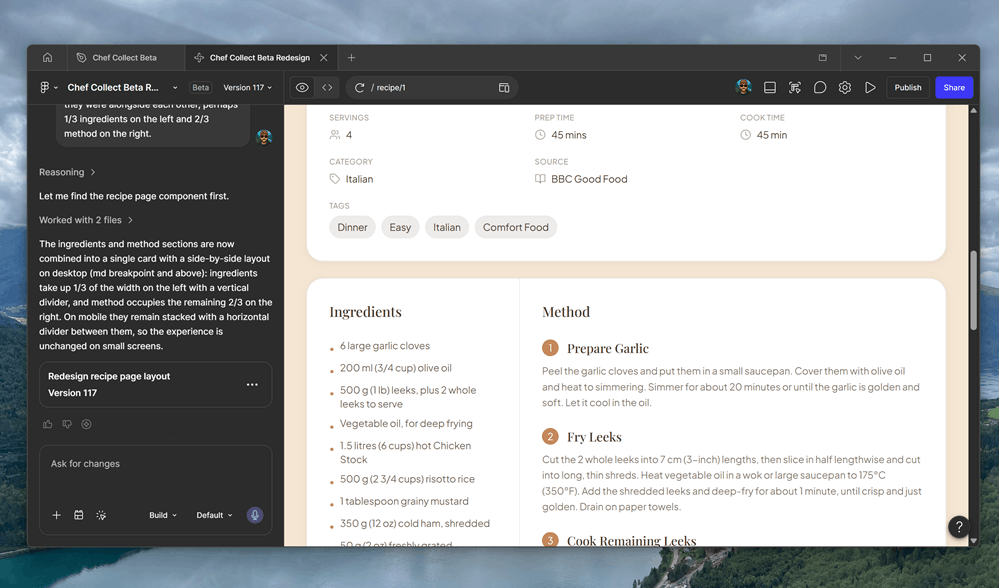
One of the clearest examples was the total redesign of the collections, recipes, and sharing system. The first version was functional, but it was not especially appealing, and it was not the best user flow. I took feedback from my friends and worked with Figma for a few days, iterating designs and testing things out. After that I was able to use html.to.design to bring the clickable prototype into Figma itself, before using the MCP Server to allow my agent squad to read and understand the designs.
AI did not remove the design work, but it made the design conversation possible. It gave me starting points, alternatives, and visual directions to react against. For someone whose instinct is normally to design the database first and worry about the emotional qualities of the interface later, that was genuinely helpful.
GitHub Copilot was the engine room for a lot of the build. I use Copilot heavily in my professional life, so I was not coming to it as someone simply trying out a new toy. I have worked with GitHub and Copilot across large engineering groups, planned and orchestrated training events for hundreds of engineers, and I am responsible for a thousand or so GitHub Enterprise accounts across our estate.
That experience helped, but building ChefCollect still felt different. In a team environment, AI coding assistants augment a wider human engineering system. There are other engineers, reviewers, testers, architects, product people, designers, delivery leads, and security voices. The organisation provides friction, review, disagreement, and course correction.
When you are building alone, you have to create some of that structure yourself. Otherwise, AI-assisted development can become chaos at speed. Or possibly chaos on speed. Either way, not ideal. You can generate a lot of code, but without review, boundaries, architecture, and quality control, speed just gets you to the wrong place faster; and one change breaks a previous feature.
That is where agentic working became important.
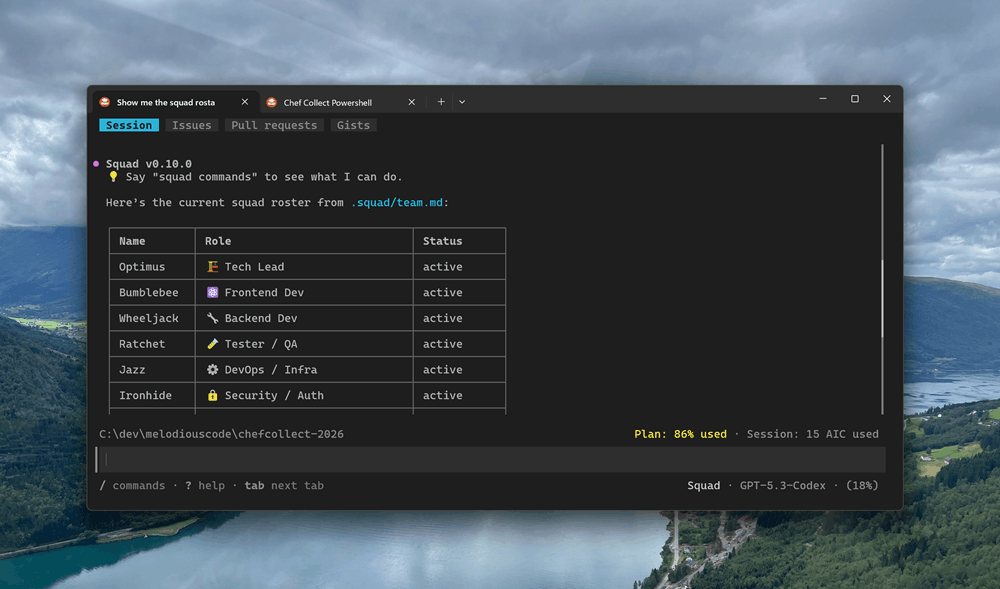
I used the Squad Framework from Brady Gaster to orchestrate multiple AI agents with different roles, responsibilities, and perspectives. The idea is simple but powerful: instead of treating the AI assistant as one generic coding helper, create a structured squad of agents with defined personas, responsibilities, and collaboration patterns.
I will not write a detailed review of Squad here, as its own site is full of information; so check out the GitHub repo and documentation site. At some point I will write a separate post about how I use the Squad Framework, because it deserves its own treatment.
For ChefCollect, the important point is that the squad became more than just a basic automations. Over time, the agents developed project memory, working patterns, rules, and expectations. Their personas evolved as the project evolved. They learned what mattered in ChefCollect, which areas of the codebase were fragile, which standards mattered, and which trade-offs had already been made.
That changed the experience from “ask an AI to write some code” to something closer to directing a small team. A strange team, admittedly. My current ChefCollect squad is named after Transformers, because if you are going to build an AI engineering team, you might as well enjoy yourself.
The squad currently includes:
| Agent | Role |
|---|---|
| Optimus | 🏗️ Tech Lead |
| Bumblebee | ⚛️ Frontend Developer |
| Wheeljack | 🔧 Backend Developer |
| Ratchet | 🧪 Tester / QA |
| Jazz | ⚙️ DevOps / Infrastructure |
| Ironhide | 🔒 Security / Authentication |
| Perceptor | 📊 Database / Entity Framework |
| Bluestreak | 📝 Documentation / DevRel |
| Grapple | 🎨 Designer / UI |
| Prowl | 🔍 Final Reviewer |
| Hoist | 📋 Agile Delivery Manager |
Along with a Scribe that writes down everything that is going on using a cheaper model. The squad also knows that I exist and can ask me for assistance, answers, or to undertake something it is not able to do in the real world.
Each agent has a slightly different lens. Optimus thinks about architecture and direction. Bumblebee focuses on the frontend. Wheeljack handles backend implementation. Ratchet cares about tests and quality. Jazz looks after infrastructure and deployment. Ironhide is there to be suspicious, especially around authentication and security. Perceptor worries about the database. Grapple tries to make things look less like I designed them. Prowl does final review. Hoist keeps things moving.
Is this the same as having an actual team of experienced humans? No. Obviously not. But it is also not nothing.
The value comes from creating deliberate friction. Instead of one AI assistant eagerly agreeing with the next instruction, the squad gives me different modes of review. It encourages me to think in terms of roles, responsibilities, and hand-offs. It stops every task from becoming “generate code now”.
One example that stuck with me was the way the agents talked with each other when working from the Figma designs. I remember seeing context scrolling up the screen as Bumblebee asked Grapple what colour a button was meant to be, because the Figma design was apparently missing some tokens. It was a small moment, but it was also one of those moments where the squad model started to feel less like a gimmick and more like a useful forcing function.
That matters because when you are the only human, you are also the product owner, architect, designer, tester, security reviewer, delivery manager, and person who has to live with the consequences. Agentic tooling does not absolve you of responsibility. It increases the amount of work you can attempt, which makes responsibility even more important.
At one point, my GitHub Copilot access disappeared due to an issue on the GitHub side. That could have stopped momentum completely, especially because Copilot had become so central to how I was working on the project. Instead, I started using OpenAI Codex more heavily for discrete changes and targeted implementation work.
Even after my Copilot access was restored, Codex stayed in the workflow. Partly because it was useful, partly because it gave me another lane, and also because, thanks to the newer GitHub Copilot AI credit model, it is sensible not to burn premium credits on every small change if another capable tool can handle the work.
My squad does not run cheap. In the first week of the new AI Credits model I burnt through my allowance, and it is a GitHub Enterprise allowance that I pay for, after only one day working on the platform. This was because my squad was using the higher-end models, mostly Anthropic. With a few changes to its costing plans, it started to use OpenAI and Google models when it did not need the power of Claude, saving money while still delivering useful work.
Now that the large areas of ChefCollect are in place, I have started to use OpenAI Codex for targeted ticket fixes and reviews, reserving the squad for new epics or larger features. That has become one of the more interesting lessons from this project. The future is probably not one AI tool. It is a toolbox. Different models, interfaces, workflows, and cost profiles make sense for different types of work. Some are better for broad reasoning; others for implementation, design exploration, small isolated patches, or when deeply embedded in your existing development environment.
The skill is not just “using AI”. The skill is knowing which tool to use, when to use it, and how much trust to give it.

One of the biggest things ChefCollect has taught me is that AI-assisted development scales the individual, but it does not remove the need for taste, judgement, discipline, and of course experience. In most ways, it makes those things more important.
When an AI assistant can generate large amounts of plausible code quickly, the bottleneck moves. It is no longer just writing code but deciding what should exist:
That is easy to underestimate. A solo AI-assisted project can move very quickly, but it can also become chaotic very quickly. You need rules, review, documentation, tests, and deployment discipline. But you also need to pause and ask whether the thing you are building is still the thing you intended to build.
The AI can help with all of that, but it cannot care on your behalf. ChefCollect needed me to care.
For all the AI tooling involved, ChefCollect would not be where it is without human feedback. Friends tried early alpha and beta versions, found confusing flows, suggested features, challenged theme choices, and pointed out where the experience did not quite match the way a normal person would think about collecting recipes.
That feedback was indispensable. As engineers, especially when building our own products, it is very easy to fall in love with the system. The architecture, the extraction pipeline, the data model, and all the clever bits.
Users do not care about the clever bits. They care whether they can upload a recipe, find it later, edit it when the AI gets something wrong, and use it while cooking without wanting to throw their phone into the stockpot.
I could not have done this without some of my friends. The UX designer friend who forcefully told me to make improvements. The AI engineer mate who gave me hints about better prompt chaining. The variety of friends who started to use it, and therefore started causing the early bug reports. That combination of challenge, encouragement, and practical feedback was every bit as important as the AI tooling.
As a thank you, early contributors have a special lifetime subscription tier called Chef’s Table. It gives them unlimited access to the platform forever. This is not really a normal subscription tier so much as a small permanent thank you to the people who helped shape ChefCollect before it was ready for the wider world.
They know who they are. I hope they know how much they helped and how much they are truly appreciated.
ChefCollect is still early. There are features I want to add, parts I want to refine, user journeys I want to improve, and more intelligence I want to add around search, classification, collections, and sharing. There is a long list of things that could be better, because there always is.
But it is real now. It exists outside my development machine. It has gone through the awkward transition from idea, to prototype, to alpha, to beta, and into production. That journey is always longer than it looks from the outside.
For me, ChefCollect has become a useful case study in what AI-assisted software development feels like when it is used seriously on a real product over a sustained period. Not a demo, not a hackathon, and not a toy app designed to show off a prompt. A real platform, built by one human with a lot of AI leverage, a squad of fictional robots, and some very patient friends.

The main lesson is not that AI can build software. We already know that AI can generate code.
The more interesting lesson is that AI can help an experienced engineer build more of the surrounding product than they could have reasonably built alone. It can help with product shaping, design iteration, implementation, review, testing, documentation, infrastructure, and delivery. It can help you keep momentum. It can help you move through the boring middle of a side project, where most ideas go to die.
But the human role does not disappear. It becomes more editorial, more architectural, more product-focused, and more responsible. You are not just typing every line yourself anymore. You are directing the work, reviewing it, challenging it, correcting it, deciding when to accept help and when to push back.
That is a very different kind of engineering. And, honestly, it is a lot of fun.
ChefCollect exists because I wanted somewhere better to keep recipes. It reached production because AI tooling gave me enough leverage to keep going. Now comes the interesting part: seeing whether other people find it useful too.
So, go check out the free account tier at chefcollect.net.
Thank you to Photo by Brett Jordan, Tudor Baciu, and Brett Jordan on Unsplash for the images used in this post (other than my cookbooks!).
A small PowerShell utility that adds Windows toast notifications to GitHub Copilot CLI hook …
One of the stranger side effects of AI-assisted software development is that it may finally …
The future of software engineering may not belong to the people who can generate the most code, …